Less repetition. More engineering
Ready-to-use.
PLC code templates.
Professional, field tested PLC code templates for device control, alarms, interlocks and sequencing.
A structured foundation for your next automation project.
Editable PLC Project
Built by Engineers
Easy to Integrate
Digital Package

BUILT AROUND THE DEVICES YOU WORK WITH
Drives / Motors / Valves / Analog IO
PLC code Package
Start your next project with a structured PLC template that brings device control, alarms, interlocks, analogue signals and sequencing together in one editable Studio 5000 project.
Dedicated blocks provide a consistent approach to controlling drives, motors and valves, with a sequence section demonstrating how to coordinate devices for automatic operation.
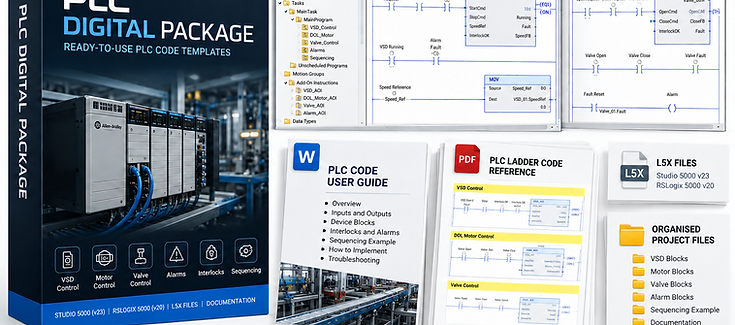
You will receive the full digital package instantly upon purchasing.
Field Tested Studio 5000 PLC Code Library
Time-to-Market: Defining a PLC code architecture is usually 50% of the project layout time. Skip that headache entirely by purchasing this PLC code package.
01 / WHAT'S INCLUDED
The building blocks. Already Brought together.
The following are included in the digital package:
DRIVES
VSD Control
Start/stop control, speed reference and device alarms.
VSD_CTL
VALVES
Valve control
Open/close commands, feedback checks and interlocks.
VLV_CTL
SIGNALS
Analogue input & output
Analogue input and output blocks for signal handling and scaling.
AI / AO
MOTORS
Single-direction DOL
Run/stop commands, interlocks and operating feedback.
DOL_One_CTL
DIAGNOSTICS
Device alarm blocks
Organised alarm logic for each device.
VSD / DOL / VLV ALARMS
MOTORS
Reversing DOL
Forward/reverse operation with directional interlocking.
DOL_Two_CTL
OPERATING DATA
Operation statistics
Device operating data within the project.
OpStats
From individual devices to a coordinated sequence, with a consistent approach throughout.
02 / PROJECT FOUNDATION
Controls that fit together.
Auto / manual control
I/O checks and permissives
Device operation from manual commands or automatic logic.
Conditions governing when devices can operate.
Sequence example
Complete project structure
Demonstrates how device blocks work together.
Organised logic to adapt and extend for your application.
PROJECT OVERVIEW .ACD + PDF
Complete PLC Template / Code
01 / DEVICE CONTROL
VSD_CTL
DOL_One_CTL
DOL_Two_CTL
VLV_CTL
VLV_CTL
Variable speed drive
Single - direction motor
Reversing motor
Valve control
Valve control
02 / SUPPORTING LOGIC
Device alarms
AI / AO
Opstats
Fault visibility
Analogue signals
Operating data
03 / SEQUENCE
ONE CONSISTENT PROJECT STRUCTURE
03 / DEVICE EXAMPLE
Valve Control and Alarms PLC Blocks / Add On Instruction

User Guide: Valve Control Block
Just enable the alarms that are required for the project by using the _enable configuration bits.
You can also edit the alarm blocks to remove alarms that are not required or add alarms specific to your application.
The supplied User Guide Word documents explain how to configure and customise the alarm blocks and are included with the PLC Code Package.
Purchase the Complete Digital Package to get access to the full PLC code library, including all device control blocks, alarms, interlocks and additional PLC programming examples.
User Guide: All Devices
04 / INSIDE THE PROJECT
See the logic.
Understand the structure.
A small sample of the VSD control block (Add On Instruction / Block) gives you a closer look at the control ladder code.

05 / THE DIGITAL PACKAGE
Editable code.
A complete PDF reference.
Receive the Studio 5000 project and a PDF printout of the entire PLC program. Use the editable project as your starting point, or follow the PDF to manually recreate and adapt the logic for another PLC platform, such as Siemens /TIA Portal.
The digital package contains
-
Studio 5000 version 23 and RSLogix version 20 PLC codes (.acd), which include (Add on Instructions, .ACD files and L5X files):
-
Analog Input Block,
-
Analog Output Block,
-
Valve Control Block,
-
Valve Alarms Block,
-
DOL Control Block,
-
DOL Alarms Block,
-
VSD Controls Block,
-
VSD Alarms Block,
-
Open / Close Interlocks
-
Start /Run Interlocks
-
-
Detailed word document on all the device blocks, detailed descriptions of inputs and outputs.
-
A PDF version of the PLC project is also included, allowing you to review the complete ladder logic without needing Studio 5000 or RSLogix 5000 installed.
Everything is provided together in one downloadable package, giving you both the editable PLC code and the documentation needed to understand and adapt it for your own projects.

PLC Project View in Studio5000
Each function block comes with code examples in how the functions blocks are used.
Purchase Complete Digital PLC Package

You will receive the full digital package instantly upon purchasing.
Field Tested Studio 5000 PLC Code Library
BEFORE YOU START
Requires compatible Studio 5000 software. Application-specific configuration, testing and commissioning are required. The PDF is a reference for other PLC brands.
The PLC code provided by PLCCodeWorks.com is supplied as a development aid and is not intended to be used as an end-user application without modification.
The supplied code will not necessarily match the specific requirements, equipment, operating conditions, safety requirements or standards applicable to your project.
Users are responsible for reviewing, modifying, testing and validating the code before implementation.
The code may be modified, adapted and incorporated into your own PLC projects as required.